
Budget OK BudgetOK

How to set a budget

How to use it

A budget in Budget OK is a monthly limit on one category. Once it is set, the category shows what is already spent and what is left, so you learn about an overspend before it happens rather than at the end of the month.
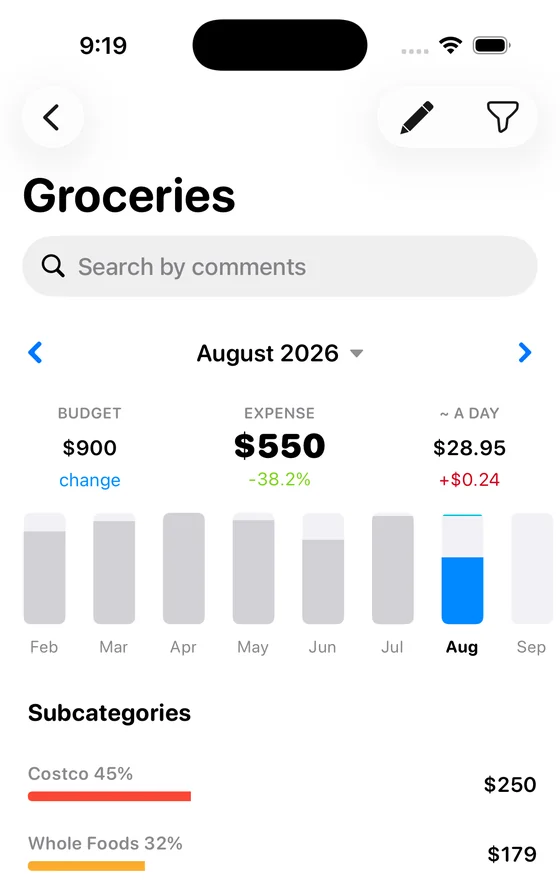
The category screen shows the limit, what is spent and the average per day.

Step by step

1. Open the category. Tap it on the dashboard, in the Expenses block.

2. Press “change” under Budget. The field sits at the top left of the category screen, next to the amount spent.

3. Enter the limit for the month and save. For example 900 for groceries. The number under the category icon on the dashboard now shows the limit.

4. Watch it as you spend. Under the category you see the spent amount against the limit. When the limit is passed, the figure is highlighted so you notice it without opening a report.

Where to get the numbers

Setting limits from scratch usually fails: the numbers are guesses and the budget breaks in the first week. Track without limits for one month first, look at what each category actually costs, and set limits from those figures. That order is what makes them hold.

Frequently asked questions

Do limits carry over to the next month?

The limit repeats every month, but an unspent remainder does not roll over. Each month starts from the full limit.

Can I set a budget for income?

No. Limits exist for expense categories, where the question “how much is left” makes sense.

What happens when I pass the limit?

Nothing is blocked. The app is a record, not a gate: it shows the overspend and leaves the decision to you.

How many categories should have limits?

Start with the three or four largest. Limits on every category turn into noise nobody reads, and the largest lines are where a change actually moves the month.

Can I see the average per day?

Yes, the category screen shows it next to the spent amount. It is the fastest way to tell whether the current pace fits the limit.

See also

How to add an expense

Step by step: record a purchase by dragging a wallet onto a category, …

How to add income

Record a payment in by dragging an income category onto a wallet, and …

Still stuck? Write to support@budgetok.app.